Asynchronous I/O in JavaScript
Web 2.0 Application Architecture
JavaScript
- Lightweight, interpreted, object-oriented language
- Client-side (browser) and server-side (node.js, AppsScript)
- Standard
- Current stable release is ECMAScript 2024/June 2024
- Major characteristics
- Function is an Object
- passing functions as arguments to other functions
- returning functions as values from other functions
- assigning functions to variables
- storing functions in data structures.
- Anonymous functions
- declared without any named identifier to refer to it
- Arrow functions
- Closures
Javascript Runtime
- Stack
- Contains frames, i.e. function parameters and local variables
- Heap
- Objects are allocated in a heap, a region of memory.
- Queue
- A list of messages to be processed
- Message is data and callback to be processed
Stack
- When running a program...
					function foo(b) {
					  let a = 10
					  return a + b + 11
					}

					function bar(x) {
					  let y = 3
					  return foo(x * y)
					}

					console.log(bar(7)) //returns 42
- calling
bar: a frame is created with bar's arguments and variables.
bar calls foo: a new frame with foo's args and vars is created.foo returns: the top frame element is popped out of the stack.bar returns: the stack is empty.
Event Loop
	      while (queue.waitForMessage()) {
	        queue.processNextMessage()
	      }
- Message = data + callback to be processed
- Messages are process completely one by one
- No "clashes" across messages' processing
- Processing should not block for a long time – Workers
- Brwoser adds a new message when an event occurs and there is an event listener
Run-to-completion
- Each message is processed fully before any other message is processed.
- A function runs entirely before any other code runs
- unlike in preemtive multitasking
- If a message takes much time to complete, all work can be blocked!
Multiple Runtimes
- Runtime
- Stack, Heap, Message Queue
iframe and a Web worker has its own runtimes
- Communication between runtimes
- Runtimes communicate via
postMessage
- A runtime can receive a message if it listens to message events
Web Workers
- A code that runs in a worker thread
- Every worker runs event loop; communicate via posting messages
- Can do anything, but manipulate DOM
- Can spawn a new workers
- They are thread-safe
- Workers Types
- Dedicated workers – accessible by scripts that created them
- Shared workers – accessible by multiple scripts (iframes, windows, workers)
				// main.js
				var myWorker = new Worker('worker.js');

				something.onchange = function() {
				  myWorker.postMessage([value1,value2]);
				}

				// worker.js
				onmessage = function(e) {
				  var workerResult = 'Result: ' + (e.data[0] * e.data[1]);
				  postMessage(workerResult);
				}

				// ... and terminate
				myWorker.terminate()
Node.js
- Node.js
- Web server technology, very efficient and fast!
- Event-driven I/O framework, based on JavaScript V8 engine
- Any I/O is non-blocking (it is asynchronous)
- One worker thread to process requests
- You do not need to deal with concurrency issues
- More threads to realize I/O
- Open sourced, @GitHub, many libraries
- Future platform for Web 2.0 apps
- Every I/O as an event
- reading and writing from/to files
- reading and writing from/to sockets
    						// pseudo code; ask for the last edited time of a file
    						stat( 'somefile', function( result ) {
    						  // use the result here
    						} );
Node.js Event Loop
- Allows Node.js to perform asynchronous I/O operations.
                       ┌───────────────────────┐
                    ┌─>│        timers         │
                    │  └──────────┬────────────┘
                    │  ┌──────────┴────────────┐
                    │  │     I/O callbacks     │
                    │  └──────────┬────────────┘
                    │  ┌──────────┴────────────┐
                    │  │     idle, prepare     │
                    │  └──────────┬────────────┘      ┌───────────────┐
                    │  ┌──────────┴────────────┐      │   incoming:   │
                    │  │         poll          │<─────┤  connections, │
                    │  └──────────┬────────────┘      │   data, etc.  │
                    │  ┌──────────┴────────────┐      └───────────────┘
                    │  │        check          │
                    │  └──────────┬────────────┘
                    │  ┌──────────┴────────────┐
                    └──┤    close callbacks    │
                       └───────────────────────┘
- Six phases, each phase has a FIFO queue of callbacks to execute.
- timers – executes callbacks sheduled by
setTimeout() and
setInterval()
- I/O callbacks – executes all I/O callbacks except close callbacks.
- idle/prepare – used internally
- poll – retrieve new I/O events
- check – invokes
setImmediate() callbacks
- close callbacks – executes close callback, e.g. socket.on('close', ...).
HTTP Server in Node.js
- HTTP Server implementation
- server running at
127.0.0.1, port 8080.
						const http = require('http');

						const hostname = '127.0.0.1';
						const port = 3000;

						const server = http.createServer((req, res) => {
						  res.statusCode = 200;
						  res.setHeader('Content-Type', 'text/plain');
						  res.end('Hello World');
						});

						server.listen(port, hostname, () => {
						  console.log(`Server running at http://${hostname}:${port}/`);
						});
Google Apps Script
- Google Apps Script
- JavaScript cloud scripting language
- easy ways to automate tasks across Google products and third party services
- You can
- Automate repetitive processes and workflows
- Link Google products with third party services
- Create custom spreadsheet functions
- Build rich graphical user interfaces and menus
                            // create spreadsheet menu
                            function onOpen() {
                              var ss = SpreadsheetApp.getActiveSpreadsheet();
                              var menuEntries = [ {name: "Say Hi", functionName: "sayHi"},
                                                  {name: "Say Hello", functionName: "sayHello"} ];
                              ss.addMenu("Tutorial", menuEntries);
                            }

                            function sayHi() {
                              Browser.msgBox("Hi");
                            }

                            function sayHello() {
                              Browser.msgBox("Hello");
                            }
JavaScript Language Overview
Objects and Arrays
                        // objects - key/value pairs
                        var obj = { name: "Tomas", "main-city" : "Innsbruck", value : 3 };
                        obj.name = "Peter"; // assign the name property another value
                        obj["main-city"] = "Prague"; // another way to access object's values; it's not an array!

                        // arrays
                        var a = ["Tomas", "Peter", "Alice"];
                        for (var i = 0; i < a.length; i++)
                            // do something with a[i]

                        // combinations of arrays and objects
                        var obj_a = [
                            { name: "Tomas", city: "Innsbruck" },
                            { name : "Peter", city : "Prague" },
                            { name : "Alice", cities : ["Prague", "Brno"] } ];

                        for (var j = 0; j < obj_a.length; j++)
                            // do something with obj_a[j].name, ...
Functions
                        // assign a function to a variable
                        var minus = function(a, b) {
                            return a - b;
                        }

                        // call the function;
                        // now you can pass 'minus' as a parameter to another function
                        var r2 = minus(6, 4);
Functions
- Function Callbacks
- You can use them to handle asynchronous events occurrences
                        // function returns the result through a callback, not directly;
                        // this is not a non-blocking I/O, just demonstration of the callback
                        function add(a, b, callback) {
                            callback(a + b);
                        }

                        // assign the callback to a variable
                        var print = function(result) {
                            console.log(result);
                        };

                        // call the function with callback as a parameter
                        add(7, 8, print);
Functions as values in object
                        var obj = {
                            data : [2, 3, "Tomas", "Alice", 4 ],

                            getIndexdOf : function(val) {
                                for (var i = 0; i < this.data.length; i++)
                                    if (this.data[i] == val)
                                        return i;
                                return -1;
                            }
                        }

                        obj.getIndexOf(3); // will return 1
Closures
- Closures
- A function value that references variables from outside its body
                        function adder() {
                                var sum = 0;
                                return function(x) {
                                        sum += x;
                                        return sum;
                                }
                        }

                        var pos = adder();

                        console.log(pos(3)); // returns 3
                        console.log(pos(4)); // returns 7
                        console.log(pos(5)); // returns 12
Objects
this problem
- A new function defines its own
this value.
                        function Person() {
                          // The Person() constructor defines `this` as an instance of itself.
                          this.age = 0;

                          setInterval(function growUp() {
                            // the growUp() function defines `this` as the global object,
                            // which is different from the `this`
                            // defined by the Person() constructor.
                            this.age++;
                          }, 1000);
                        }

                        var p = new Person();
                        function Person() {
                          var that = this;
                          that.age = 0;

                          setInterval(function growUp() {
                            // The callback refers to the `that` variable of which
                            // the value is the expected object.
                            that.age++;
                          }, 1000);
                        }
Arrow Functions
- Arrow function expression
- defined in ECMAScript 2015
- shorter syntax than a function expression
- non-binding of
this
                        function Person(){
                          this.age = 0;

                          setInterval(() => {
                            this.age++; // |this| now refers to the person object
                          }, 1000);
                        }

                        var p = new Person();
Syntax, function body
                        // concise body syntax, implied "return"
                        var func = x => x * x;

                        // with block body, explicit "return" required
                        var func = (x, y) => { return x + y; };

                        // object literal needs to be wrapped in parentheses
                        var func = () => ({foo: 1});
Callback Hell
											loadScript('/my/script1.js', function(script) {

											  loadScript('/my/script2.js', function(script) {

											    loadScript('/my/script3.js', function(script) {
											      // ...continue after all script 1,2 and 3 are loaded
											    });

											  })

											});
Complex asnychronous code is hard to understand and manage
Solution
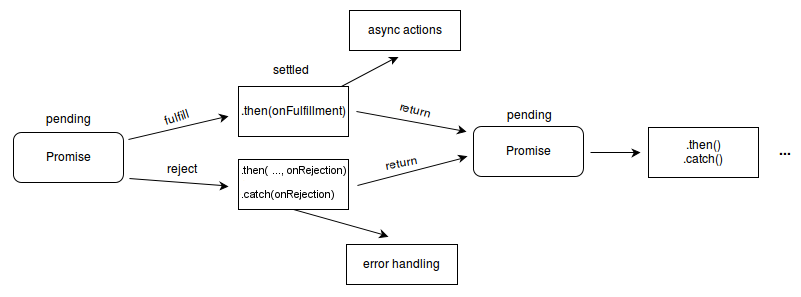
- Promise – a proxy to a "future" value of the function
- Async/await – language constructs to work with asynchronous code
Promise Object
- Promise
- An object representing completion or failure of an asynchronous operation.
- A proxy for a value not necessarily known when the promise is created.
Callback Hell Example
const request = require('request');

request("http://w20.vitvar.com/toc.json", { json: true },
(err, res, body) => {
   if (err)
     console.log("error: " + err)
   else {
     console.log(body)
     request("http://mdw.vitvar.com/toc.json", { json: true },
     (err, res, body) => {
         if (err)
           console.log("error: " + err)
         else
           console.log(body)
       })
   }
})
Promise Example
- A chain of Promise objects
					const request = require('request');

					function get_json(url) {
					  return new Promise((resolve,reject)=>{
					    request(url, { json: true }, (err, res, body) => {
					      if (err)
					        reject(err)
					      else
					        resolve(body)
					    })
					  })
					};

					get_json('http://w20.vitvar.com/toc.json')
					.then((data)=>{
					  console.log(data)
					  return get_json('http://mdw.vitvar.com/toc.json')
					})
					.then((data)=>{
					  console.log(data)
					})
					.catch((err)=>{
					  console.log("error: " + err)
					})
async/await
async
- the function always returns a Promise
- if there is no Promise, the returned value is wrapped into Promise
										async function f() {
										  return 1;
										}

									  f().then((v) => alert(v));
await
- makes program to wait until the promise is resolved or rejected
- it returns the resolved value and throws an exception when the promise is rejected
- can only be usded inside
async function
										async function f() {
										  var promise = new Promise((resolve, reject) => {
										    setTimeout(() => resolve("done!"), 1000)
										  });

										  var result = await promise; // wait untill the promise is resolved

										  alert(result);
										}

										f();