#META_LECTURE#: #TITLE#

Modified: #LAST_MODIFIED#
Humla v#HUMLA_VERSION#
Cloud Native

Overview

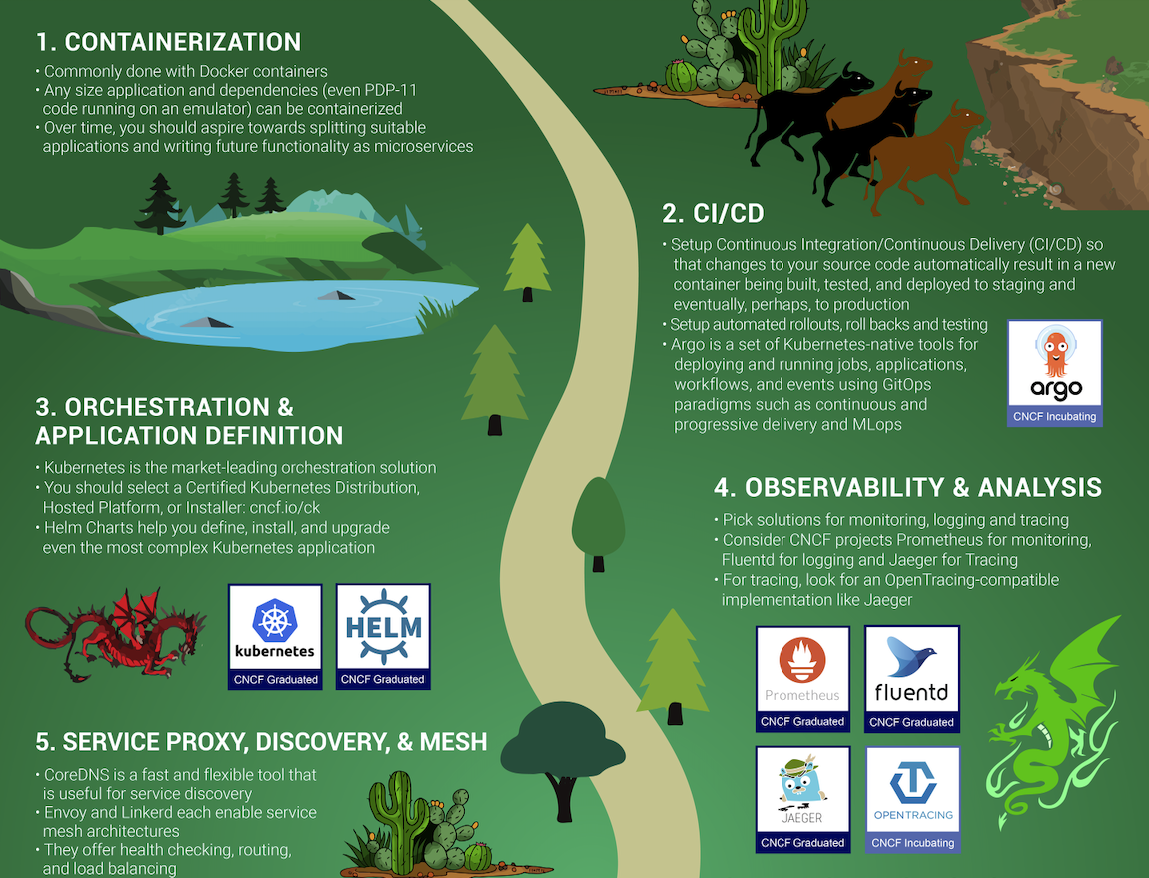
CNCF Trail Map

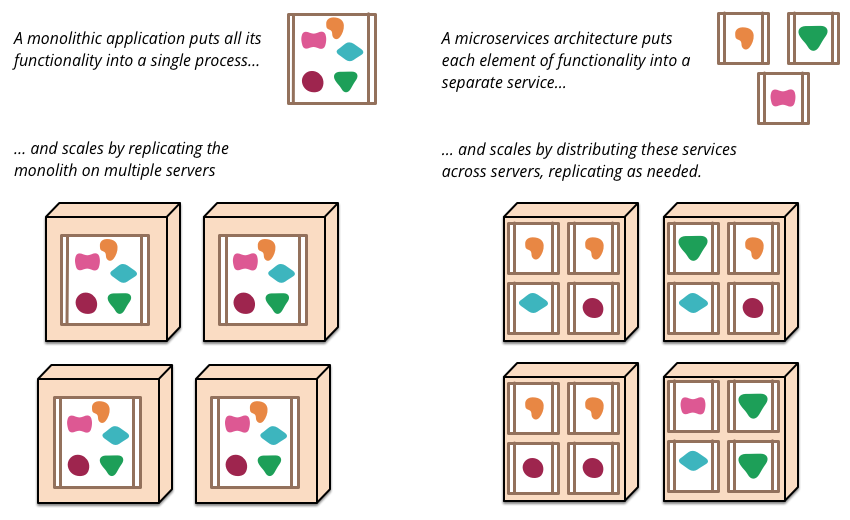
Microservices

Overview

Major Characteristics

Kubernetes
Basic Concepts

Containers

  • Linux Containers
    • Process isolation using Linux namespaces and union file system (OverlayFS)
    • Builds on Linux namespaces and union file system (OverlayFS)
    • Container engine (containerd) – accepts user inputs, pulls images from registry
    • Container runtime (runc) – communicates with kernel to start cont. processes
  • Linux Namespaces – 7 types providing process isolation
    • mnt – isolates filesystem mount points
    • uts – isolates hostname; ipc – isolates message queues, semaphores, shared memory
    • pid – isolates PID number space; containers have their own init process with PID 1
    • net – private network stack (interfaces, routing tables, sockets)
    • user – isolates UID/GID number spaces; cgroup – isolates cgroup root directory
  • Container Images
    • Union of read-only layers via OverlayFS storage driver; immutable, never change
    • Containers are ephemeral; persistent data stored in bind mounts
    • Dockerfile – a script to build images; each instruction creates a new layer
    • Images stored in a registry (e.g. Docker Hub); pulled and pushed via registry API

Overview

  • In your architecture...
    • Containers are atomic pieces of application architecture
    • Containers can be linked (e.g. web server, DB)
    • Containers access shared resources (e.g. disk volumes)
  • Kubernetes
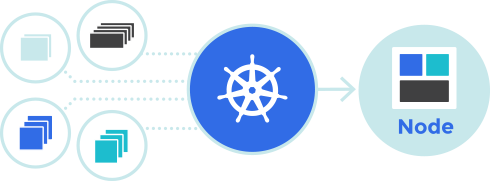
    • Automation of deployments, scaling, management of containerized applications across number of nodes
    • Based on Borg, a parent project from Goolge

Key Design Principles

  • Kubernetes provides abstractions that separate application deployment from the underlying infrastructure details
  • Application workloads and infrastructure decoupling
    • Compute: Define what to run without specifying where it runs
    • Storage: Applications request storage independent of storage backend
    • Networking: Stable access to applications regardless of IPs or location
  • Benefits
    • Portability across on-prem and cloud environments
    • Scalability and resilience through dynamic scheduling
    • Consistency and standardization of deployment model
    • Reduced vendor lock-in thanks to open standards

Desired State and Reconciliation

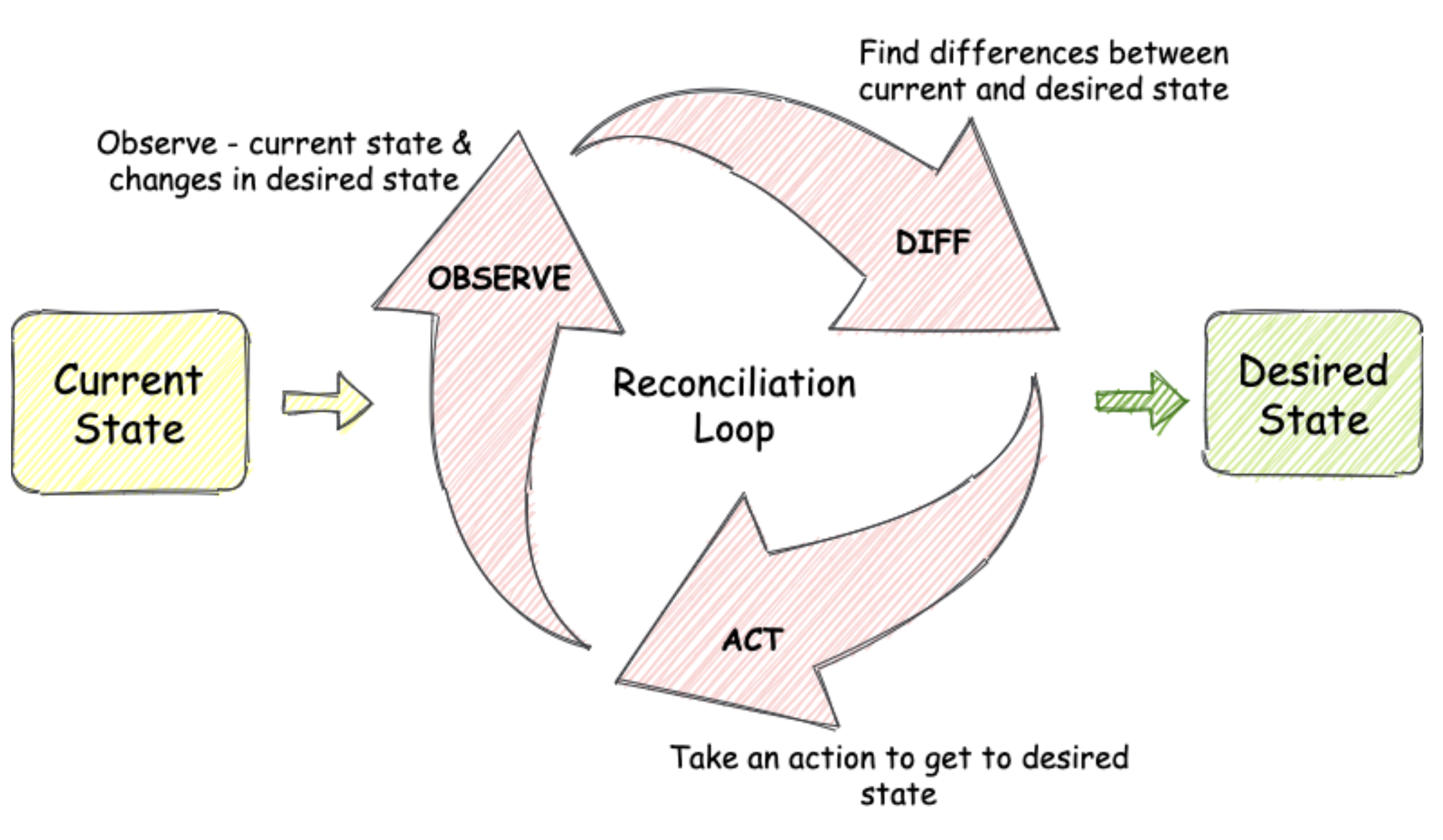
  • Kubernetes operates on a desired state model
    • Users define the state they want through object specifications (YAML)
    • Example: “there should be 3 replicas of this application”
  • Actual State vs. Desired State
    • Kubernetes constantly monitors the cluster
    • If the actual state drifts from the desired state, it takes action to fix it
  • Reconciliation Loop
    • Controllers continuously compare desired vs. actual state
    • Automatically performs actions such as restarting, rescheduling, or scaling Pods

Features

  • Automatic binpacking
    • Automatically places containers onto nodes based on their resource requirements and other constraints.
  • Horizontal scaling
    • Scales your application up and down with a simple command, with a UI, or automatically based on CPU usage.
  • Automated rollouts and rollbacks
    • Progressive rollout out of changes to application/configuration, monitoring application health and rollback when something goes wrong.
  • Storage orchestration
    • Automatically mounts the storage system (local or in the cloud)
  • Self-healing
    • Restarts containers that fail, replaces and reschedules containers when nodes die, kills containers that don't respond to user-defined health checks.
  • Service discovery and load balancing
    • Gives containers their own IP addresses and a single DNS name for a set of containers, and can load-balance across them.
Core Concepts and Architecture

Core Building Blocks

  • Cluster
    • A set of worker nodes and a control plane
    • Runs and manages containerized applications
  • Node
    • A worker machine in Kubernetes (VM or physical)
    • Runs Pods scheduled by the control plane
  • Control Plane
    • Manages the overall state of the cluster
    • Schedules workloads and responds to cluster events
  • Pod
    • The smallest deployable unit in Kubernetes
    • One or more tightly-coupled containers
    • Containers share networking and storage within a Pod

Architecture

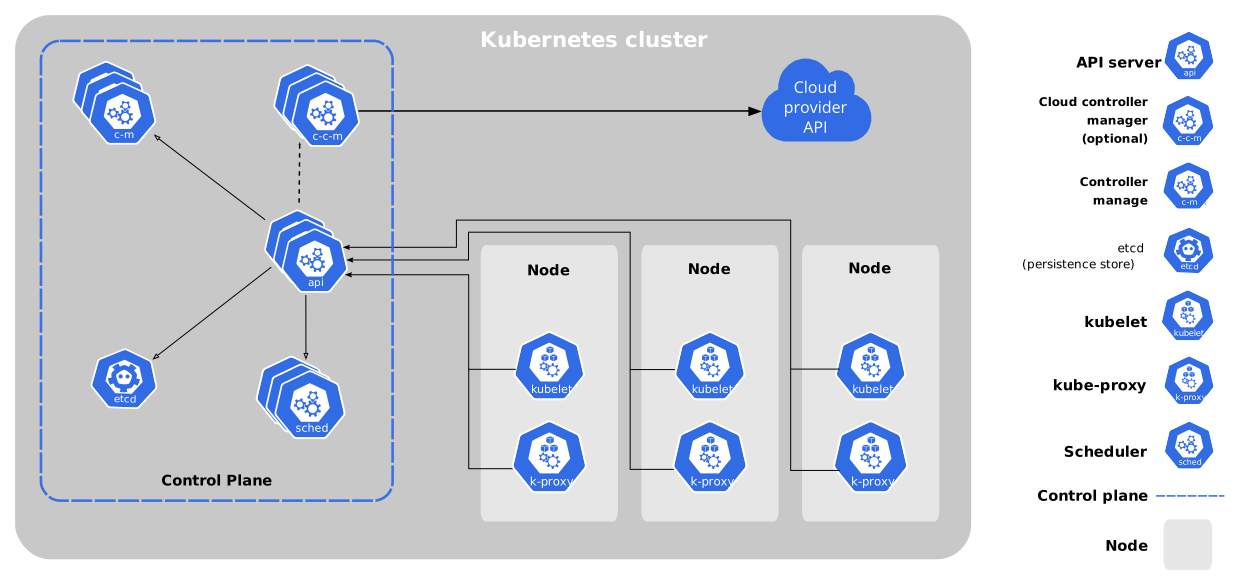
Control Plane Components (Part 1)

  • Global decisions about the cluster
    • Schedulling
    • Detecting and responding to cluster events, starting up new pods
  • kube-apiserver
    • exposes the Kubernetes API
    • The API server is the front end for the Kubernetes control plane.
  • etcd
    • highly-available key value store used to store all cluster data
  • kube-scheduler
    • watches for newly created Pods with no assigned node
    • selects a node for Pods to run on.
    • Decision factors: resource requirements, hardware/software/policy constraints, affinity and anti-affinity specifications

Control Plane Components (Part 2)

  • kube-controller-manager
    • runs controller to ensure the desired state of cluster objects
    • Node controller
      • noticing and responding when nodes go down
    • Job controller
      • creates Pods to run one-off tasks to completion.
    • Endpoints controller
      • Populates the Endpoints object (that is, joins Services, Pods).
  • cloud-controller-manager
    • Integration with cloud services (when the cluster is running in a cloud)
    • Node controller
      • checks if a node has been deleted in the cloud after it stops responding
    • Route controller
      • For setting up routes in the underlying cloud infrastructure
    • Service controller
      • For creating, updating and deleting cloud provider load balancers

Node

  • Kubernetes runtime environment
    • Run on every node
    • Maintaining running pods
  • kubelet
    • An agent that runs on each node in the cluster
    • It makes sure that containers are running in a Pod.
  • kube-proxy
    • maintains network rules on nodes
    • network rules allow network communication to Pods from inside or outside of the cluster
    • uses the operating system packet filtering layer or forwards the traffic itself.
  • Container runtime
    • Responsible for running containers
    • Kubernetes supports several container runtimes (containerd, CRI-O)
    • Any implementation of the Kubernetes CRI (Container Runtime Interface)

Container Stack

Workloads

Namespaces

  • Logical grouping of cluster resources
    • Allow you to organize and separate objects within a Kubernetes cluster
    • Useful when multiple teams, environments, or projects share the same cluster
  • Rationale
    • Provide isolation and boundaries between workloads
    • Prevent name collisions
      • Objects can have the same name if in different namespaces
    • Enable resource limits and access control per namespace
  • Usage
    • Common namespaces: default, kube-system, kube-public, kube-node-lease
    • Create separate namespaces for e.g. dev, test, prod
    • Commands run in a namespace unless another is specified

Pod

  • Pod
    • A group of one or more tightly-coupled containers.
    • Containers share storage and network resources.
    • A Pod runs a single instance of a given application
    • Pod's containers are always co-located and co-scheduled
    • Pod's containers run in a shared context, i.e. in a set of Linux namespaces
  • Pods are created using workload resources
    • You do not create them directly
  • Pods in a Kubernetes cluster are used in two main ways
    • Run a single container, the most common Kubernetes use case
    • Run multiple containers that need to work together

Workloads

  • An application running on Kubernetes
  • Workloads run in a set of Pods
  • Pre-defined workload resources to manage lifecylce of Pods
    • Deployment and ReplicaSet
      • managing a stateless application workload
      • any Pod in the Deployment is interchangeable and can be replaced if needed
    • StatefulSet
      • one or more related Pods that track state
      • For example, if a workload records data persistently, run a StatefulSet that matches each Pod with a persistent volume.
    • DaemonSet
      • Ensures that all (or some) Nodes run a copy of a Pod
      • Such as a cluster storage daemon, logs collection, node monitoring running on every node
    • Job and CronJob
      • Define tasks that run to completion and then stop.
      • Jobs represent one-off tasks, whereas CronJobs recur according to a schedule.

Deployment Spec Example

  • Deployment spec
  •           apiVersion: apps/v1
              kind: Deployment
              metadata:
                name: nginx-deployment
              spec:
                selector:
                  matchLabels:
                    app: nginx          
                replicas: 3 # tells deployment to run 3 pods matching the template
                template:
                  metadata:
                    labels:
                      app: nginx
                  spec:
                    containers:
                    - name: nginx
                      image: nginx:1.14.2
                      ports:
                      - containerPort: 80          
            
    • A desired state of an application running in the cluster
    • Kubernetes reads the Deployment spec and starts three app instances
    • If an instance fails, Kubernetes starts a replacement app instance
Services

What is a Service?

  • A Kubernetes Service is an abstraction that defines
    • A logical set of Pods
    • A policy to access them.
  • Pods are ephemeral – their IPs change when recreated
  • A Service provides a stable virtual endpoint for a set of Pods
  • Services enable reliable communication between components:
    • Internal pods communication
    • External access to cluster workloads
  • Each Service gets
    • A DNS name and
    • virtual IP (ClusterIP) inside the cluster.
  • Kubernetes component kube-proxy manage routing to backend Pods.

Service Types

  • ClusterIP
    • Exposes the Service on an internal IP in the cluster only.
    • Used for internal communication between Pods.
  • NodePort
    • Exposes the Service on each Node’s IP at a static port (e.g. 30080).
    • Accessible externally via NodeIP:NodePort.
  • LoadBalancer
    • Provisions an external load balancer (e.g. in cloud environments).
    • Routes external traffic to the Service.
  • ExternalName
    • Maps the Service to an external DNS name.
    • No proxying — pure DNS CNAME redirection.

ClusterIP Service Example

  • Example configuration exposing an NGINX Deployment internally:
  •           apiVersion: v1
              kind: Service
              metadata:
                name: nginx-svc
              spec:
                selector:
                  app: nginx
                ports:
                - protocol: TCP
                  port: 80
                  targetPort: 8080
                type: ClusterIP
                  
  • Pods with app=nginx receive traffic through ClusterIP.
  • DNS name: nginx-svc.default.svc.cluster.local
  • Used by other Pods to connect via http://nginx-svc:80.